
- Guide
- No Comment
Optimize Google Business Profile to Rank Higher in Google Maps

Have you ever wondered how companies appear higher in Google Maps? Well, this is due to several factors. But one of the most important ones is an optimized Google Business Profile (GBP).
GBP is a digital container of your brand that displays its name, address, phone number, working hours, and other information. But how can you optimize it to improve the Google Maps ranking of your business? If you want to find this out, you’ve come to the right place.
In this blog post, we’ll provide instructions on how to optimize a Google Business Profile to rank higher in Google Maps. We’ll discuss all of the main optimization strategies based on the new criteria for 2026. So, let’s get started!
A Quick Breakdown!
If you want to rank higher in Google Maps, you should optimize the GBP profile with the following factors:
- Accurate business details.
- Active engagement features.
- AI-driven search compatibility.
- Consistent reviews.
- Strong local relevance signals.
To understand how to implement these, keep reading!
Step 1: Add Accurate and Consistent Information About Your Business
Google hates businesses that confuse or misguide people with inaccurate information. In fact, that’s why you won’t see such brands in the top ranking results of Google Maps. So, the first thing you need to do is to update your GBP with accurate details.
Whether it’s the name, address, phone number, business hours, holiday details, or primary and secondary categories, everything should be correct. Even minor inconsistencies, such as using ‘Street’ on your website and ‘St.’ in the online directory, can mislead Google and weaken your credibility.
Pro Tip: Choose the most suitable industry for the primary category section, whereas list your services in the secondary category section.
Step 2: Conduct AI-Search Optimization
Like search engine optimization, AI-search has also influenced the rankings on Google Maps. Therefore, you can’t optimize your profile with keywords only—you should also enhance your GBP by considering that AI now understands the cause for a search.
The best way to go about it is to think as if your profile is having a conversation with AI. The clearer and more context-rich the information is, the more likely your company will rank higher in Google Maps when people ask AI-powered questions.
This means that nowadays, you need to write Google Business Profile’s content in a way that mimics how users search. For instance, mentioning something like ‘affordable plumbing service in NYC’ has a better AI-optimization score than simply highlighting ‘plumber’ in the description.
Additionally, you should also include FAQs, structured data, and service descriptions. Doing so will help Google relate your profile to real-world queries. Let’s understand this better through an example.
Suppose that someone searches for ‘Who can de-shed my Golden Retriever today?’ In that case, if your GBP only says ‘Pet Groomer,’ you will automatically become an unsuitable match. However, if your profile’s service description clearly says something like this: ‘Long-Hair De-shedding Treatment,’ your FAQs answer the same-day appointment question, and the code of your structured data clearly informs Google about your business type and price range, AI will connect all these dots and surface you at the top shelf.
Step 3: Stay Active and Keep Engaging
Google dislikes static profiles, just as it does false and inconsistent information. That is simply because they represent ignorance and neglect.
For this reason, you should always keep your profile fresh. One excellent way to do so is to regularly post events, offers, or updates. This will help Google understand that you’re engaging with the audience.
Additionally, you should also have high-quality photos and videos. And if possible, don’t forget to add geo-tagged information, as doing so will strengthen your local presence.
Remember that the more you interact with your profile, the more Google considers your business as a reliable, up-to-date option for local searchers. Therefore, you should also use the Q&A section as an engagement tool. For instance, you can ask questions to customers or instantly respond to their queries.
Step 4: Prioritize Reviews and Reputation
Organic review is one of the strongest ranking signals in Google Maps. Therefore, push your satisfied customers to leave detailed feedback that naturally incorporates the target keyword.
Here’s a perfect example of a high-quality, relevant, and keyword-enriched review:
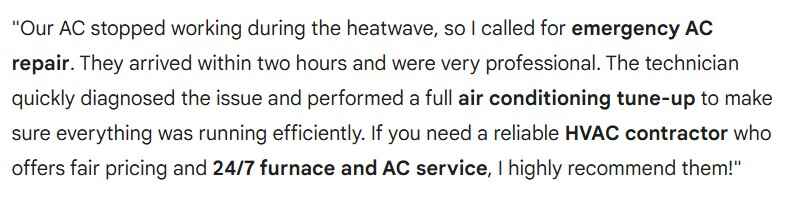
Even if someone leaves a negative review, don’t just let it sit there. Respond professionally without making things personal. This engagement will be a sign of trustworthiness, which will ultimately influence the behavior of Google’s AI algorithms as well as people. And all of this will eventually present you as a reputable brand in your industry.
Step 5: Invest in Local Authority Signals
Like traditional SEO, authority also plays a crucial role in the ranking of Google Maps. Why?
Simply because Google nowadays doesn’t look at your GBP only—it also tries to analyze your business’s relationship with the local community.
For example, if a brand receives natural backlinks from directories, local groups, and news sites, it will confirm its existence, even if the linking simply feels like a virtual endorsement. And that’s exactly why you should aim for getting featured on:
- Local chamber of commerce site.
Or
- Regional blogs.
This will signal Google that your brand is really a part of the local business community.
Additionally, you should also invest in creating geo-targeted content. For instance, you can craft posts on collaboration with nearby brands or local events. Such an action will further make your relevance more compelling to Google. And ultimately, you will be more likely to appear higher in Google Maps.
Step 6: Integrate Customer Interaction Features
Content may be the king for traditional SEO, but as far as Google Maps is concerned, convenience holds the throne. For this reason, Google nowadays heavily prefers brands that reduce friction in their operations and make it easier for customers to fulfill their desired goals.
So, you should enable customer interaction features, such as:
- Direct booking through your profile.
- Instant chats or messaging.
These options will encourage real-time engagement. And that’s how your brand will become more accessible to customers and have a positive experience.
Thus, customer interaction integrations turn your static profile into a dynamic service hub and send strong signals to Google. And ultimately, it can boost your visibility and conversions.
Concluding Remarks — Final Verdict
All in all, Google Business Profile optimization is not about filling in the details anymore; it’s more about AI-driven relevance, engagement, and trust signals. For this reason, brands that actively manage reviews, publish updates, and integrate advanced features are dominating the visibility on Google Maps.
Alan Mike is a seasoned website content writer specializing in SEO-friendly, engaging content. With expertise in various industries, Mike creates clear, informative, and compelling copy to boost user engagement and drive organic traffic for clients.
